Plans and what they unlock
Compare Local and Cloud, then manage your plan.
1. What we promise
Plans change. These three things do not, and the sections below explain how each one works.
- A Local license is a permanent purchase. Its first year of updates and support is included. After that, $49 a year brings each new release; let the renewal lapse and you stay on the last release you were entitled to, which goes on receiving security fixes.
- No change of plan traps a manuscript. When an evaluation ends, or a Cloud plan ends with no Local license behind it, Tabularia opens as before and your own projects become readable but not editable. A Local license keeps them editable on your devices. Word, Markdown, and complete project archive exports stay available to you in every state.
- Reviewing costs your reviewers nothing. People you invite as Readers or Editors are never charged: you need the Cloud plan to share, and they need only an account, with no paid plan. Team projects work differently, because their members hold seats the team pays for.
2. Local plan: your local writing application
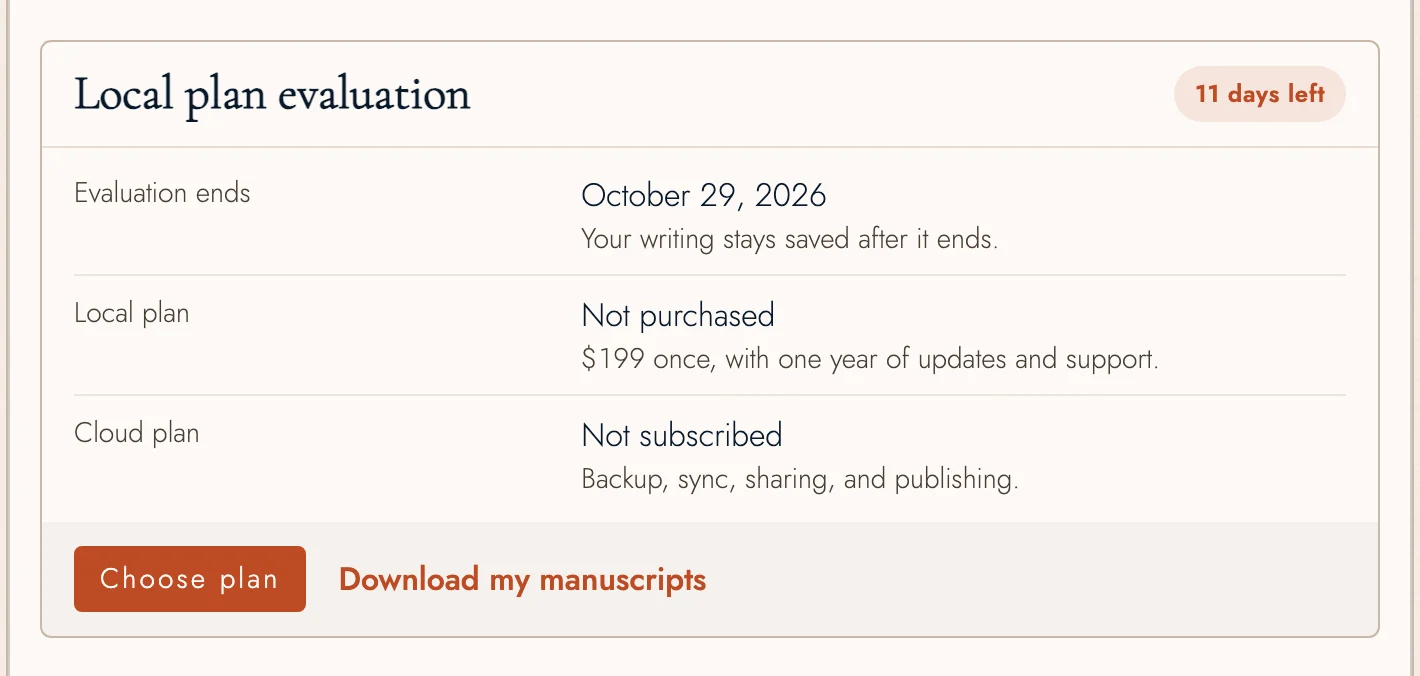
The Local plan costs $199 USD, one time. Buy immediately or evaluate it free for 14 days without a credit card. Your evaluation starts the first time you open a project of your own in Tabularia while online.
- Unlimited Projects and words.
- Writing, plotting, and typesetting preview.
- Drafts, revision comparisons, and merging.
- Local Snapshots and History.
- Complete local Project archives and supported folder backups.
- Final PDF and EPUB exports after purchase.
When the evaluation ends, Tabularia still opens. Your own Projects open read-only: you can read, search, and navigate them, and export Word, Markdown, or a complete Project archive, but not edit them or start new ones. Manuscripts other Writers share with you keep working as their plan allows. Your saved Project data stays in this browser, and Account links to a download list you can use without opening Tabularia. Purchasing the Local plan or subscribing to the Cloud plan makes your own Projects editable again.
Existing early-access Free accounts keep their current access. Feature updates continue through December 31, 2026; after that, existing installations stay on their last eligible release, with security and data-integrity fixes provided separately. Purchasing the Local plan or the Cloud plan restores access to current feature releases.
The Local plan includes one year of feature updates. Optional annual renewal is $49, plus applicable tax, and is off by default. Choose it at purchase to authorize the first annual charge after the included year. Account lets you pause future renewals or resume them. Pausing preserves the updates period already included or paid for and never pauses your Local license. Security and data-integrity fixes continue.
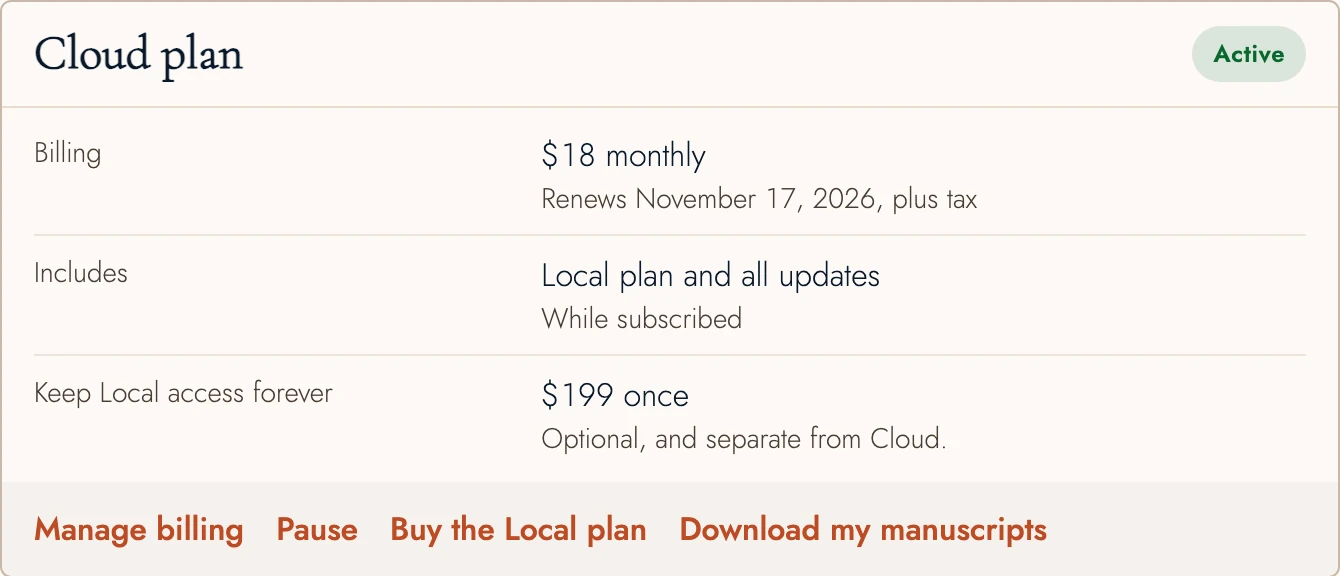
The Cloud plan includes current updates while active, so starting the Cloud plan pauses a separate updates renewal. That pause outlasts the subscription: once Cloud ends, the renewal stays off until you press Turn renewal back on on your account page, and until then you keep the last release your updates covered. Ending the Cloud plan never removes a Local license. Without one, permanent access under a Local license requires the separate $199 purchase; previous Cloud subscription payments are not credited toward it.
The Local plan stores your writing locally. Browser storage can be cleared or lost, so keep complete backups outside the browser. The Cloud plan adds hosted, off-device backup and sync.
3. The Cloud plan: backup, sync, and sharing
The Cloud plan includes the Local plan while subscribed and adds:
- Online backup and cross-device sync.
- The AI connector, which lets Claude or ChatGPT read your manuscript and suggest edits you accept or reject.
- Sharing manuscripts for review, and inviting Readers and Editors.
- Publishing a draft as a web page.
- Cloud-backed snapshots and history.
The remote AI connector checks your Cloud subscription on each request and pauses when it ends. Your synced copy is retained.
Current prices are on the Pricing page. The Team plan is still in development.
4. Sharing follows the owner's plan
Cloud plan features key on the project owner's plan, not each participant's. If you own a Project under the Cloud plan, Readers and Editors join free and get the full reading or review experience. The Author role writes the Manuscript itself and needs a Cloud subscription of its own for personally owned Projects. Access to organization-owned Projects follows the Team plan’s purchased seats.
The same rule runs the other way. When the owner’s Cloud plan ends, everyone they shared a project with can still open and read it, but nobody can change it until the owner subscribes again. A Local license on the owner’s account does not change that, and neither does the plan a reviewer holds.
5. If a subscription lapses
When the Cloud subscription ends, new cloud saves pause. You can still read, download, or delete existing cloud data and export your manuscripts locally. What happens to your own projects depends on whether you bought a Local license. With one, they stay editable on your devices, and only the Cloud features stop. Without one, they open read-only. Either way, the projects you shared become read-only for the people you shared them with, as described above. Resubscribing turns sync and sharing back on, and editing too wherever it had stopped.
6. Managing billing
Manage billing on your account page opens Stripe’s portal for payment methods, invoices, cancellation, and monthly or yearly billing. Stripe handles payments; Tabularia does not store full card numbers. The portal returns to your account. See Pricing page.
Pause is available for subscriptions you bought yourself. Pausing keeps your account and data but stops new cloud saves. Reading, downloading, deleting, and local manuscript exports still work. Choose Resume Cloud to restart sync.
A paused plan counts as an ended one for editing, too. If you hold a Local license, your projects stay editable on your devices. If you don't, they open read-only until you resume, and so do the projects you shared, for everyone you shared them with.
If a payment fails
When a Cloud renewal can't be charged, the plan card reads Payment failed and gives a date to update your card by. Cloud keeps working until that date, and Manage billing is where you change the card. If no payment goes through in time, Cloud features switch off as they would in a lapse, while everything already synced stays readable.
Sometimes a bank asks you to confirm the very first payment. The card then shows Finish payment, and Cloud starts once that payment clears.
7. Continue reading
- Previous: What to ask your assistant
- Next: Your account
- All guide articles
Try it on your own book
Start a free 14-day evaluation. No card needed.