A book, from rough draft to reading edition.

Follow Morgan Vale through a revision of The Lantern Coast. The demo project shows how the writing, its reference material, and the decisions around it fit together.

Open the part you want to work on.

The Lantern Coast holds several books. Today, Morgan is revising The Missing Harbor. Working scope brings that book into view while the rest of the series stays in the same manuscript.

A chapter or scene can be just enough for the next pass. Widen the scope when you need the surrounding story again.

Working scope in the Guide
Working Scope choices from the entire Series down to the current Scene.
One manuscript, several books, and a choice of how much to see at once. Open the screenshot at full size Open the screenshot at full size

Follow the clue back to the scene.

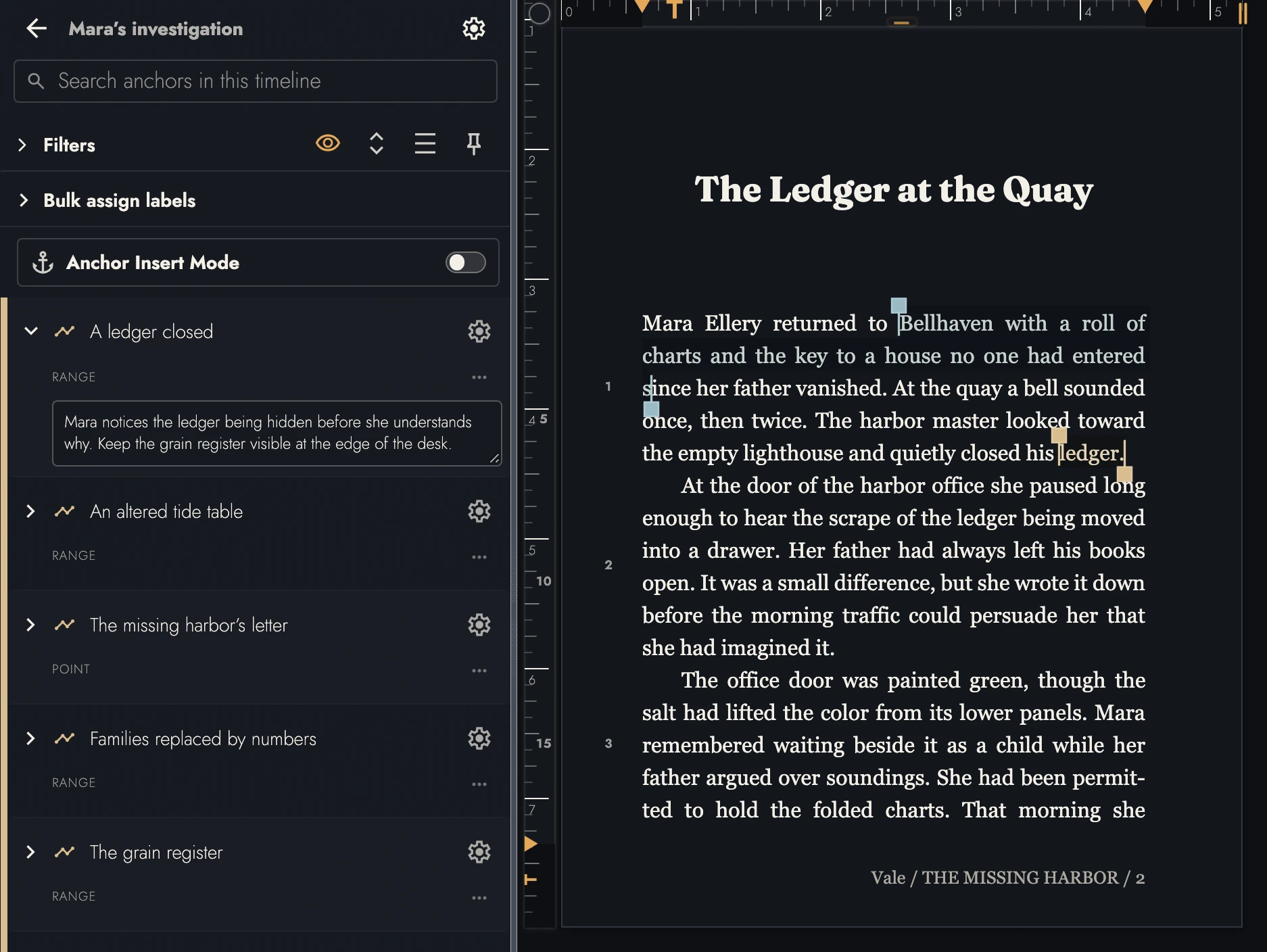
Mara notices a ledger being hidden. That small moment has to carry a promise the story pays off much later.

An anchor on Mara’s investigation timeline takes Morgan from a clue in the plan to the exact passage carrying it, with the note about what the reader should notice still beside the words.

Timelines and anchors in the Guide
Investigation Anchors beside the selected ledger passage and its planning note.
Each anchor in the investigation timeline opens on the passage that carries it. Open the screenshot at full size Open the screenshot at full size

Keep the character beside the writing.

Was Mara carrying a chart case or a notebook? Her Sheet keeps the answer close, along with the nicknames used by people who know her.

The same library holds places, items, and concepts. Notes can stay brief: the facts you need during revision, without hunting through another file.

Sheets in the Guide
Mara Ellery’s person Sheet with a portrait, two nicknames, and completed character fields.
Mara’s portrait, two nicknames, relationships, and revision notes share one reference card. Open the screenshot at full size Open the screenshot at full size

Try the opening another way.

A quieter opening might reveal more than a dramatic one. Morgan captures an alternative draft and tries it without overwriting the existing version.

Whether the experiment rewrites one paragraph or a whole book, Morgan can switch drafts in place, recognize each version by its color, and compare their wording in Markup before choosing what to merge.

A named snapshot before a large rewrite gives Morgan an earlier reading to return to.

Drafts and merging in the Guide
The drafts panel filtered to opening alternatives, each with its own color and scope, and a returned Editor review.
Opening alternatives have distinct colors and scopes. The returned Editor review has its own row. Open the screenshot at full size Open the screenshot at full size

Give an Editor a version to review.

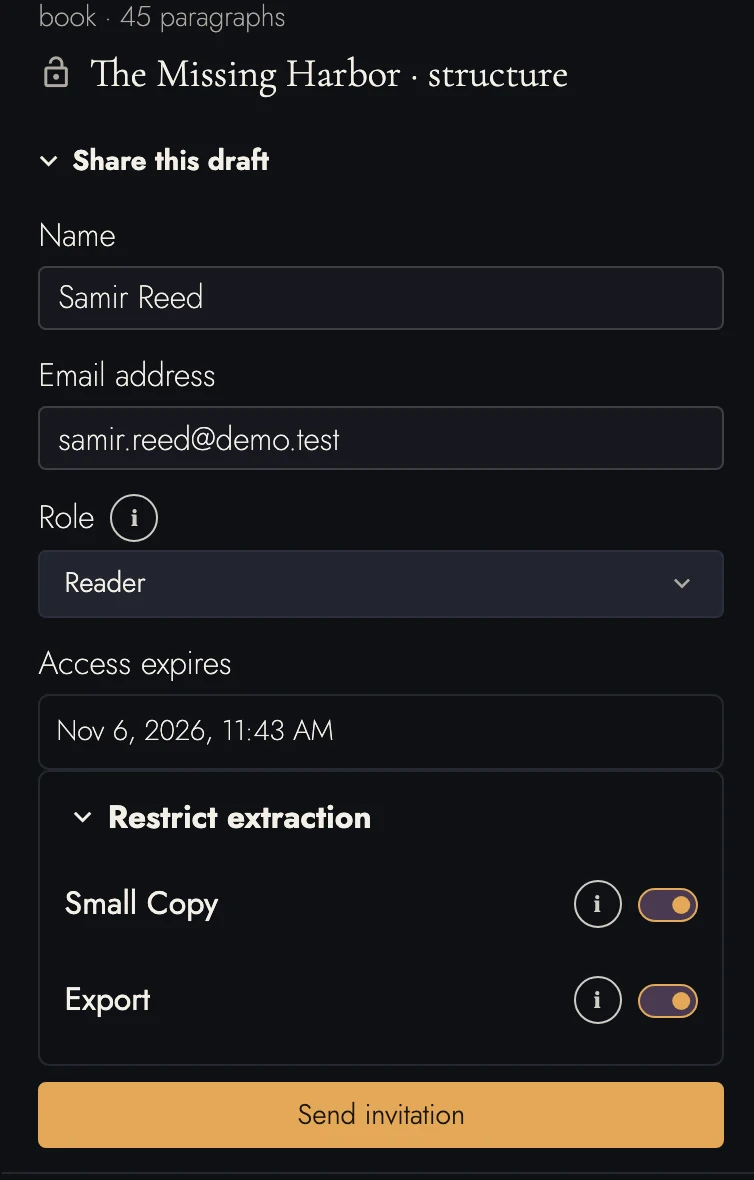
Morgan shares one draft of the first book with an Editor. The invitation names the role, and the Editor reads that draft as it was sent while Morgan keeps writing in another.

Cloud enables sharing. Invited Readers and Editors take part without a paid plan of their own, and what an Editor sends back waits for Morgan to accept or reject it.

The review workflow in the Guide
Book-scoped Reader invitation and extraction restrictions.
Sharing one book’s draft: who it is for, the role they hold, and how long their access lasts. Open the screenshot at full size Open the screenshot at full size

Make the book look like itself.

The Missing Harbor gets a title page and a lantern illustration. Morgan can shape its chapter openings and choose matching book decorations while the writing is still in progress.

Each book keeps its own matter pages and page numbering. A second volume can have a different opening treatment without redesigning the first.

Book design in the Guide
The first book’s title page with the series name, title, and author, above centered lantern artwork.
A centered illustration on The Missing Harbor’s title page, under the series name, The Lantern Coast. The title and author are linked to the book’s details; every book shares the series name. Open the screenshot at full size Open the screenshot at full size

Let someone read the result.

A reading edition gives the story a page of its own. Readers can move by chapter, choose an appearance, and settle into the words.

Publish a whole draft or only the passages you choose, on any plan and during the evaluation too, with no sync to wait for. For a submission or a copy to keep, export covers Word, PDF, and EPUB; while you evaluate, the PDF and EPUB come marked as proofs. You choose the destination.

Publishing and reading in the Guide
Private reading page showing the current Chapter and reading navigation controls.
A private reading page presents the writing with chapter navigation and reader controls. Open the screenshot at full size Open the screenshot at full size

Keep writing when the connection goes.

When the connection drops, Morgan keeps writing at the caret in the middle of a chapter. The status panel confirms that each change is saved on this device and waits there until the connection returns.

Open a project on the device before you need it offline. Cloud sync resumes when the connection returns; independent exports and a backup folder give you copies to keep outside the browser.

Local saves and offline writing in the Guide
A chapter open for writing while offline, with the status panel saying changes are saved on this device and will sync later.
The page stays editable offline, and the status panel says the changes are saved on this device and will sync when the connection returns. Open the screenshot at full size Open the screenshot at full size

Bring your own work to the page.

Start a project or import a manuscript you already have. The Guide is there when you need the steps for a particular task.

Take another tour.

  • Novels → Timelines for every thread, story structures, and alternative openings.
  • Nonfiction → An argument built chapter by chapter, with its sources kept attached.
  • Screenplays → An imported short, a dialogue pass, and a script ready for the next app.
  • Articles → An essay from the article starter to a second try at its lede.
  • Series → Several books in one manuscript, each with its own matter.
  • Editors → A review from the Editor’s side, then back to the author.
  • Switching apps → Bringing a Scrivener project across, structure and all.

A book from the first sentence

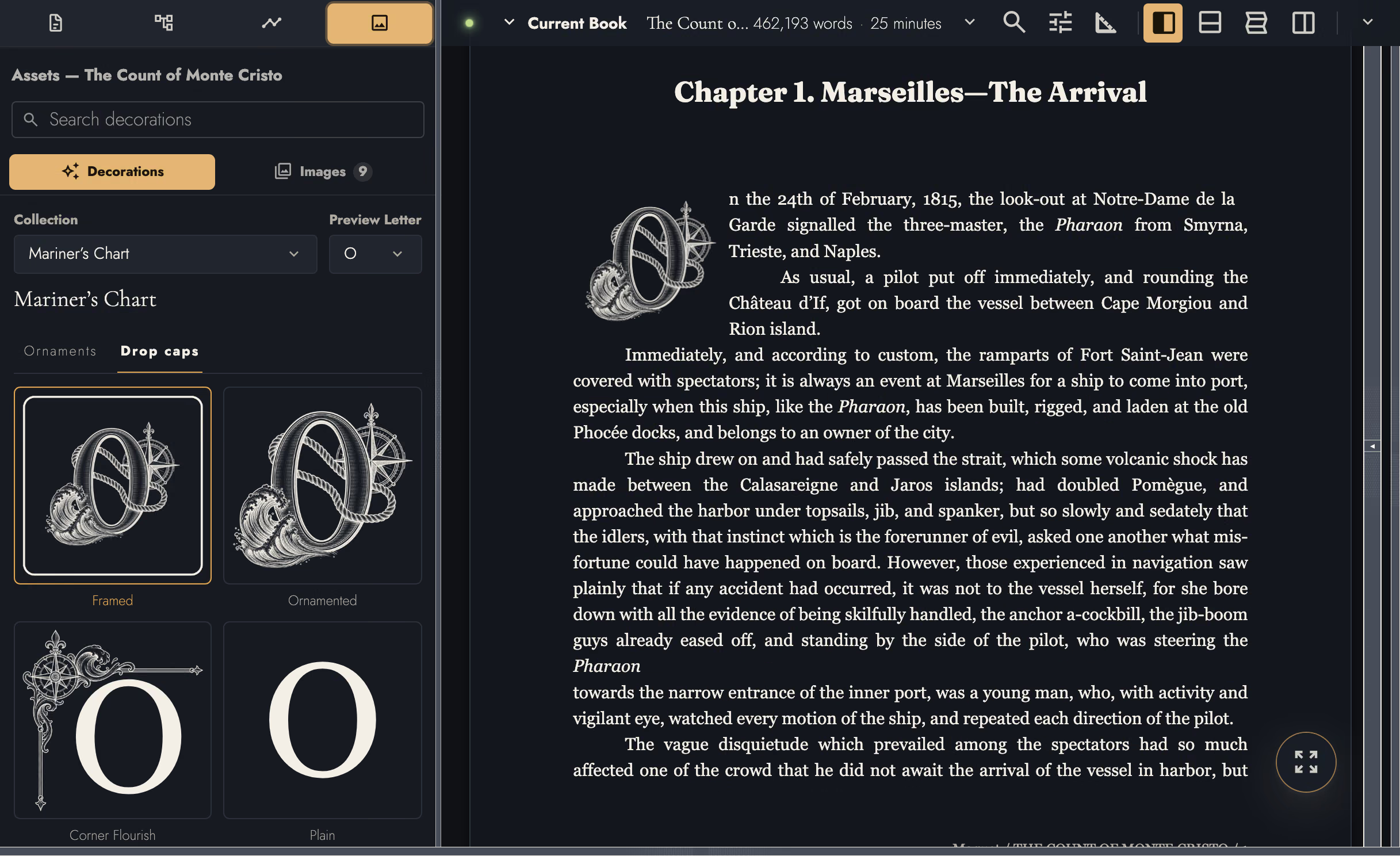
Most writing software asks you to type now and format later, so your book does not exist until you assemble it at the end. Tabularia sets the page as a book from the first sentence, with its decorations already in place:

  • illustrated drop caps with ornaments drawn to match
  • scene-break flourishes
  • folios that follow each book’s own numbering
  • front and back matter belonging to the book that holds them

There is no assembly step between the draft and your formatted book, because what you are editing already is your final book.

Illustrated drop-cap and ornament choices beside a typeset chapter opening

Import, review, and collaborate

Start with the writing you have, or a blank page, and keep the work connected through drafting, revision, and publication.

02

Keep the cast and the research beside the page.

Each person in the book gets a Sheet with a picture, nicknames, and notes, and so does each place, object, or idea the story leans on. The library opens next to the chapter you are writing, and search finds a character by any name they go by.

03

Write without a connection.

Every change saves on your device first, so a train with no signal costs you nothing. The Local plan opens your book offline for as long as you own it, and a backup folder you choose keeps a copy outside the browser.